Once an invoice or quote is sent, key fields become permanently locked to ensure that what your customer receives, views, and pays matches your internal business records. This guide breaks down what can be modified at each stage of a document's lifecycle.
Editable fields by document status
1. Draft or scheduled status
When an invoice or quote is in Draft status (unsent), every field is fully editable, including line items, tax settings, issue dates, customer details, and document numbers.
2. Active sent statuses (Sent, Viewed, Overdue)
Once a document is sent or viewed by a customer, safety locks apply to prevent discrepancies:
- What you can edit:
- Due Date / Expiry Date: Push the date forward (grant an extension) or bring it closer.
- Customer Notes: Update public notes (refreshes live on customer permalinks and future PDF downloads).
- Internal Notes: Edit private internal notes for your team.
- Payment Options (Quotes Only): Modify selected payment preferences on a quote so the correct payment methods auto-populate if the quote is accepted and converted into an invoice.
- Automated Receipts (Invoices Only): Turn off / on automated receipts being sent upon payment being recorded.
- What is locked:
- All other information
3. Closed & finalized statuses (Accepted, Rejected, Paid, Uncollectible, Void)
Once a document reaches a finalized state, all customer-facing aspects are permanently archived:
- What you can edit: Internal Notes only.
- What is locked: Every other field on the document.
How to modify a locked document
If you need to make changes to a locked field on an active invoice or quote, follow these steps:
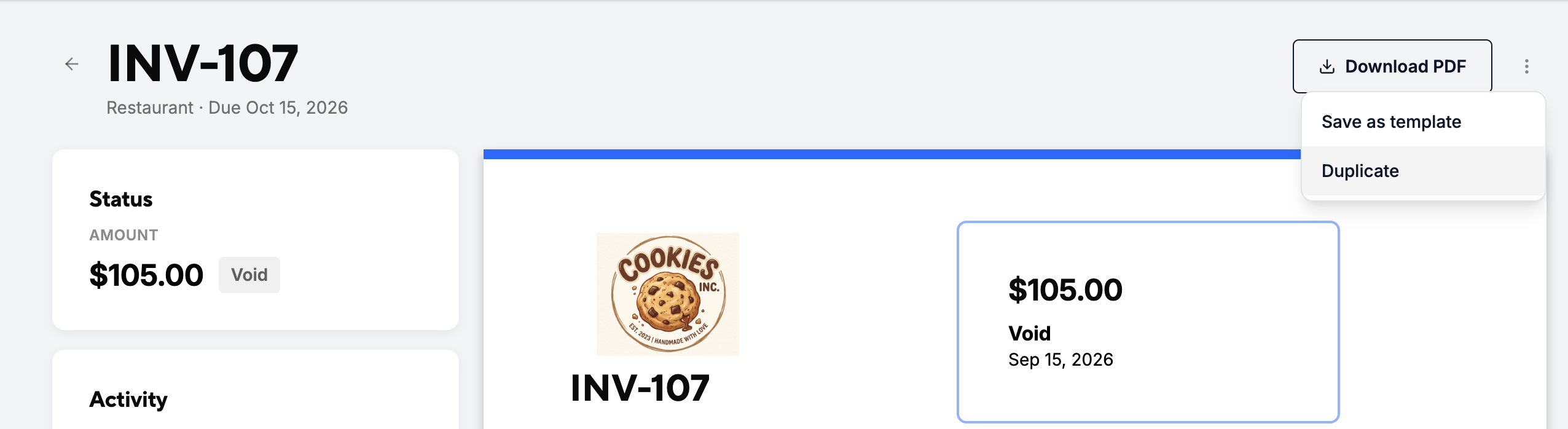
- Void the original document: Open the document, click the three dots (...) menu, and select Void. This cancels the record and deactivates any active customer links.
- Duplicate: Select Duplicate from the menu to create a fresh draft with all original details pre-filled.
- Make updates & resend: Make your changes (e.g., line items or tax rates) and send the new document to your customer.
Why the document lock exists
Document locking is a legal and accounting safeguard. Once an invoice or quote is sent to a client, it becomes an active financial record. Locking these details ensures full transparency between you and your customer, prevents accidental tampering with billed amounts, and maintains a clean, audit-proof paper trail for tax compliance.